 Jigar Karangiya
In Magento 2, custom extensions play a crucial role in enhancing functionality and extending the capabilities of online stores. However, keeping track of these extensions and their respective versions can become challenging, especially in larger projects. In this blog post, we will explore a code snippet that allows you to effortlessly extract the names and versions of custom extensions from any Magento 2 project.
To find all third-party or we can say custom extensions with paths and their versions from any project,
Run this code directly in any Magento 2 project’s root directory :
for config in app/etc/config.php; do
    modules=$(grep -oP "'\K\w+(?=' => 1,)" "$config" | grep -v '^Magento_' | sort)
    while read -r module; do
        version=$(grep -oP "(?<=<module name=\"$module\" setup_version=\")[^\"]+" {vendor/,app/code}/*/*/etc/module.xml)
        echo "Module: $module, Version: $version"
    done <<< "$modules"
done
The provided code utilizes shell scripting to extract information from a Magento 2 installation’s app/etc/config.php file and module.xml files. Let’s break down the steps:
- Looping through
**app/etc/config.php**:- The code initiates a loop to read the
**config.php**file, which contains the configuration settings for installed modules.
- The code initiates a loop to read the
- Extracting custom module names:
- Within the loop, the code employs a
grepcommand to extract module names (excluding Magento core modules) from theconfig.phpfile. These names represent custom extensions in the Magento 2 project.
- Within the loop, the code employs a
- Sorting module names:
- The extracted module names are sorted alphabetically using the
**sort**the command for easier readability and organization.
- The extracted module names are sorted alphabetically using the
- Retrieving module versions:
- For each custom module, the code reads the
**module.xml**files within the project’s**vendor/**and**app/code/**directories. - It uses another
**grep**command to find the version information specified in the **module.xml**files for each module.
- For each custom module, the code reads the
- Displaying the results:
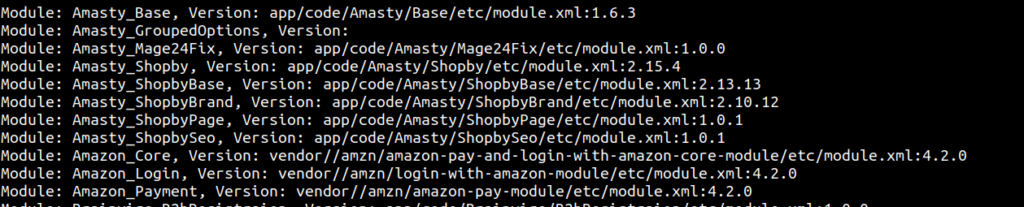
- Finally, the code outputs the module names and their corresponding versions in a user-friendly format.
Output :